
TL;DR (3 quick clues an email is phishing)
- The “From” address looks like you (or someone you know), especially for a security alert.
- The message looks slightly “off” (odd wording, layout, or logos) and tries to create urgency or fear.
- Hover over any button/link: if the web address isn’t a legitimate Microsoft (or expected vendor) site, don’t click.
In 1971, Ray Tomlinson sent the first email. Today, criminals send an estimated 3.4 billion phishing emails every day. Even though we’ve covered phishing before, we’ve seen a recent spike in messages that look more convincing and can bypass some standard security filters.
Please share this guidance with your staff and volunteers. These emails often use fear or urgency to pressure people into clicking a link or button. Two common subject lines we’re seeing are:


We’ve also seen similar messages that appear to come from DocuSign.
The wording varies, but the message is essentially: “Click this button or you’ll lose access to your account.”
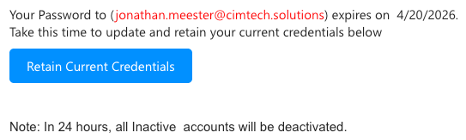
One detail that confuses people: the “From” address may look like your own email address. This trick is called “spoofing”, it means a criminal has forged the sender field to make the message look like it came from you. It does not mean your account has been hacked or that you sent anything.

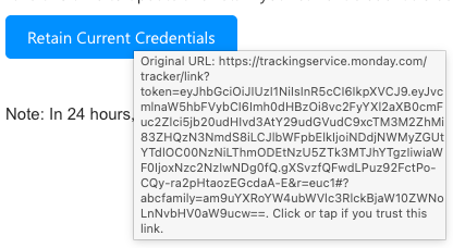
We’re calling out this campaign because the people behind it are using techniques that can get past standard security settings.
To respond, CIM is enabling additional email security protections that large providers (like Google and Yahoo) now expect. The goal is simple: stop more malicious email before it reaches inboxes.
What are these new protections?
Email was invented before anyone worried much about security, so over the years the industry created three tools that work together to verify that a message is genuinely from who it claims to be. Think of them as a three-part ID check for your email. Here’s what each one does:
SPF — The Approved Senders List
SPF (Sender Policy Framework) is a published list that tells the email world: “These are the only servers allowed to send email on behalf of our organization.” When a message arrives, the receiving mail server checks whether it came from an approved source. If it didn’t — for example, if a scammer is trying to send mail pretending to be from your domain — it can be flagged or rejected.
Everyday analogy: It’s like a venue’s approved vendor list. Only caterers on the list are allowed to bring food in. Anyone showing up without being on the list gets turned away at the door.
DKIM — The Tamper-Evident Seal
DKIM (DomainKeys Identified Mail) places a hidden digital signature on every outgoing email. When the message arrives at its destination, the receiving server checks the signature to confirm the email wasn’t altered in transit and really did originate from the claimed sender. If the signature is missing or doesn’t match, it’s a red flag.
Everyday analogy: It’s like a wax seal on a letter. If the seal is intact when you receive it, you know it hasn’t been opened or tampered with since it left the sender.
DMARC — The Policy Enforcer
DMARC (Domain-based Message Authentication, Reporting, and Conformance) ties SPF and DKIM together and tells receiving mail servers what to do if an email fails those checks — for example, send it to junk, or reject it outright. It also sends reports back to the domain owner so they can see if someone is trying to impersonate them. This is the layer that Google and Yahoo now require senders to have in place.
Everyday analogy: If SPF is the approved vendor list and DKIM is the wax seal, DMARC is the security guard who checks both, and has written instructions for what to do if either one fails.
Together, these three protections make it significantly harder for criminals to forge your email address or intercept messages in transit — which is exactly what the current phishing campaign is attempting to exploit.
What you may notice
As with any added protection, there can be occasional “false positives,” where a legitimate outside email is quarantined. If you’re expecting a message that doesn’t arrive (or you receive a quarantine notice), contact CIM and we’ll help review and release it when appropriate.
We know quarantine can add an extra step, and we appreciate your patience. The trade-off is significant: a single successful phishing incident can lead to major financial loss, operational disruption, and damage to trust, especially for mission-driven organizations.
Ready to take the next step?
Find out where your organization stands.
Every ministry I work with has gaps they didn’t know existed in their email security. Reach out and let’s talk through what a security posture review could look like for your organization.